
Aniimo Cheats with ESP, Autofarm and God Mode
Aniimo is an open-world creature collector where the grind is the game. You catch Aniipods, level them up, and farm Idyll for the materials every upgrade depends on. Our Aniimo cheat takes the repetition out of that loop and hands you the whole map at once.
ESP marks every player, NPC, monster, pet, chest and drop straight through terrain. God Mode, flight and 20x movement let you go anywhere without dying on the way there. The autofarm swings for you while you do something else entirely. That is what this Aniimo cheat is built to do.

What the Aniimo Cheat Includes

Visuals & ESP

Master ESP – one switch arms the overlay, then you choose what stays on
Players & NPCs – both tracked through terrain, on separate toggles
Monsters & Pets – wild creatures and tamed Aniipods on the same overlay
Chests & Loot Drops – everything worth walking to, marked through rock
Distance Labels – exact range to each target, updated live
Snaplines – a line from you straight to the target
Proper Names – real item and monster names, not internal IDs
Exploits & Autofarm

Autofarm – works Q, E and R on a loop and catches on F for you
God Mode – no damage from monsters, falls or the environment
Fly & Noclip – up to 100x, straight through terrain
Move Speed – up to 20x, on a slider you control
Teleport to Cursor – double-click anywhere and you are there
Item & Monster Vacuum – pull pickups, or creatures, straight to you
Undetectable – monsters stop noticing you exist
Aniimo Cheat System Requirements


How to stay safe with Aniimo Cheats
Everything you have in Aniimo sits on one account. Every Aniipod you caught, every cosmetic you bought, every hour of farming. A ban takes the lot, and unlike a shooter there is no quick way to rebuild it. That is the thing worth protecting here, so treat the account as the asset and play accordingly.
Keep the loader current. Every time Aniimo patches we push a rebuilt loader and you download it from the link we send you, because running yesterday’s build against today’s game is how people get caught. Free Aniimo cheats off a forum are worse than nothing, they are the fastest route to losing the account outright.
We would rather say this plainly than sell you a guarantee nobody can make: there is always some risk, ours included. Nobody who tells you otherwise is being straight with you. What we can do is keep the build quiet, keep it patched, and tell you the moment something changes.
How you use it matters more than most people think. Flying across a hub in front of thirty players, or autofarming the same spawn for nine hours straight, is what gets you reported by an actual person. Keep the loud options for empty zones and the account tends to look after itself.
Aniimo ESP Puts the Whole Map on Your Screen
Aniimo ESP is built around one idea: you decide what is worth drawing. Master ESP arms the system, then every category has its own switch. On a chest run you leave chests and loot on and turn the rest off. On a farm route you do the opposite and light up monsters only.
Boxes outline whatever you have marked, snaplines run from you to it, and distance labels update as you move so you always know how far the walk is. Names come through properly too, real item and monster names rather than the IDs the game uses internally. Nothing is stacked on by default, so the screen only ever holds what you asked for.
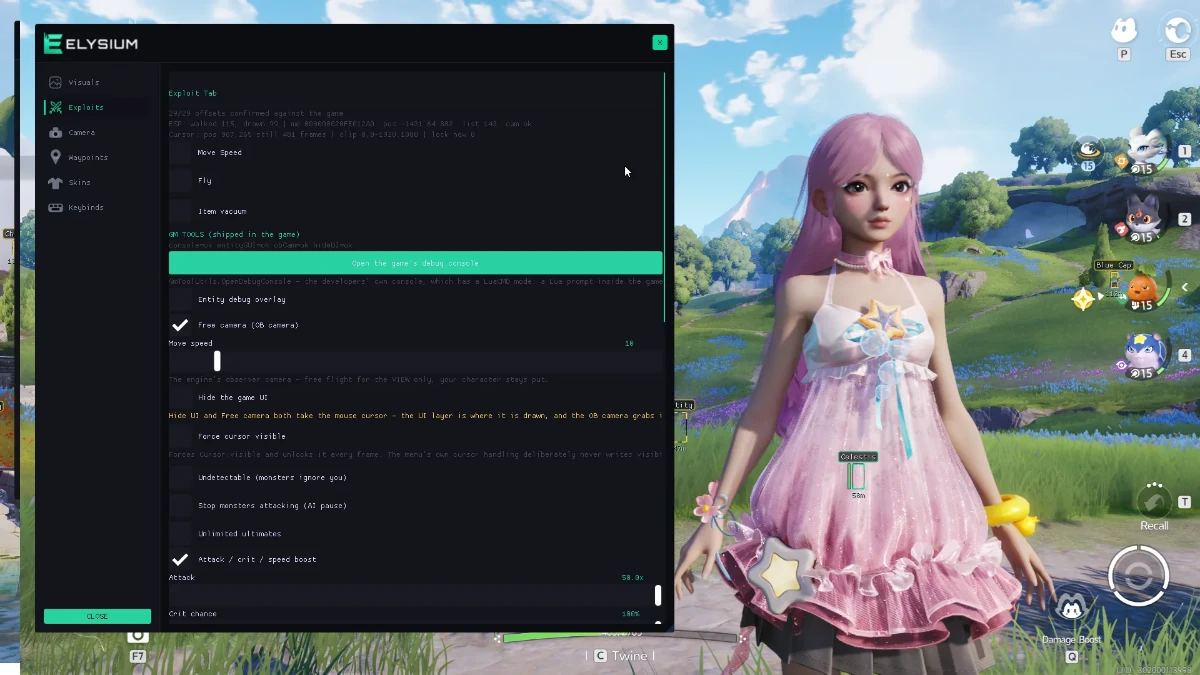
What the Visuals tab marks
Master ESP – the master switch; nothing draws until you turn this on
Players – every other player on the map, boxed and tracked through terrain
NPCs – quest givers and vendors marked so you stop hunting for the right one
Pets – your own Aniipods and everyone else's, on a toggle of their own
Monsters – wild creatures highlighted so you can pick your fights
Show 2D Box – a clean outline around anything you have marked
Names & Levels – read a target down to its level before you commit to it
Snaplines – a line from you to the target when a box alone is not enough
Chests, drops and everything worth walking to
Idyll is large and most of it is empty. The point of loot ESP is to stop you walking across it for nothing.
Chests – containers marked the moment they come into range, opened or not
Loot & Drops – everything on the ground worth picking up, visible through rock and trees
Proper Names – real item, NPC and monster names instead of the internal IDs
Distance Labels – live range to anything marked, so you judge the walk before you make it
No more sweeping empty caves. You see what is there, you decide if it is worth the trip, and you go straight to it.
Autofarm and Exploits Do the Grinding For You
Frequently Asked Questions
about the Aniimo cheat
It is a short job. You get an instructions page with your order and the whole thing usually takes about a minute end to end. The only fiddly part is the Windows security settings, and if that trips you up open a ticket and someone will walk you through it.
Not meaningfully. It is an internal cheat rather than an external one, so it runs inside the game process — that keeps the ESP locked to what you actually see on screen, and it stays light. It is still safe to use: the loader handles the injection for you and there is nothing to configure by hand. On a normal machine you are not going to notice it in your frame counter. Leaving every ESP category switched on at maximum range is the one thing that costs anything, and even that is small.
All the major credit and debit cards, PayPal, and crypto. Delivery is automatic either way, so the key and loader land in your account as soon as the payment confirms.
That is expected after a patch, and usually it shows up as the menu opening but nothing in it doing anything. Grab the rebuilt loader from the folder we linked you and it will be working again.
If the new loader still does not run, open a ticket. Time lost to a patch gets added back onto your licence, so you are not paying for days you could not use.
Open the product page, pick your runtime (right now Aniimo is sold as a single 30 day licence), add it to the cart and check out. Your key and download show up in your account straight after the payment goes through.